
In this article, I’ll walk you through the one skill most new sellers learn the expensive way: when to reorder, and how much.
Listings and ads get all the attention. Inventory is the part that quietly decides whether any of it keeps working. Run out, and the ranking you paid for starts to slip. Order too much, and your cash sits in a warehouse earning storage fees.
Here is what I will cover:
- Why a stockout on Amazon is not a pause
- The four numbers every reorder is built on
- The reorder sum, done by hand
- What Amazon’s own restock advice is worth
- How a forecast takes over once you have history
I’ll show the working in SellerDragon, the system I run accounts on. The store in the screenshots is a demo store, so the numbers are safe to look at.
Table of Contents
- Why Running Out Is Not a Pause
- Step 1: Know Your Four Numbers
- Step 2: Get Your Lead Time Honest
- Step 3: Do the Reorder Sum
- Step 4: Read What Amazon Tells You
- Step 5: Let the Forecast Take Over
- Step 6: Don’t Overshoot
- Step 7: Check Stock Before You Push Ads
- Wrap-Up
Let’s get into it.
Why Running Out Is Not a Pause
On your own webshop, being out of stock pauses sales until the next delivery lands. On Amazon it costs you position.
While you are out, you make no sales on any search. Your competitors keep selling on the same searches, and the gap grows every day. How much you lose depends on how long it lasts:
- A few days to a couple of weeks: you lose some position. With normal sales and some ad support after restocking, you usually get it back.
- The first 20 to 30 days: position erodes gradually.
- Beyond that: the loss speeds up.
- After about three months out of stock: the ranking is lost. You are not recovering, you are starting over.
Short stockouts are a setback. Long ones are a restart.
And it starts before you hit zero. FBA spreads your stock across fulfilment centres. When stock runs low, the last units sit in fewer places, so shoppers further away see a slower delivery date and buy from someone else.
The full mechanics are in How Inventory Levels Affect Visibility and Sales on Amazon. For this article, the point is simple: you plan so that it never happens.
Step 1: Know Your Four Numbers
Every reorder decision comes from four figures:
- Sales rate: units per day. Use a real average, not your best week.
- Lead time: how long from placing the order until the units are sellable at Amazon.
- Stock on hand and inbound: sellable units at Amazon, plus shipments on the way.
- Stock target: how many days of cover you want to hold as a buffer.
If you cannot write these four down for a product, you are guessing.
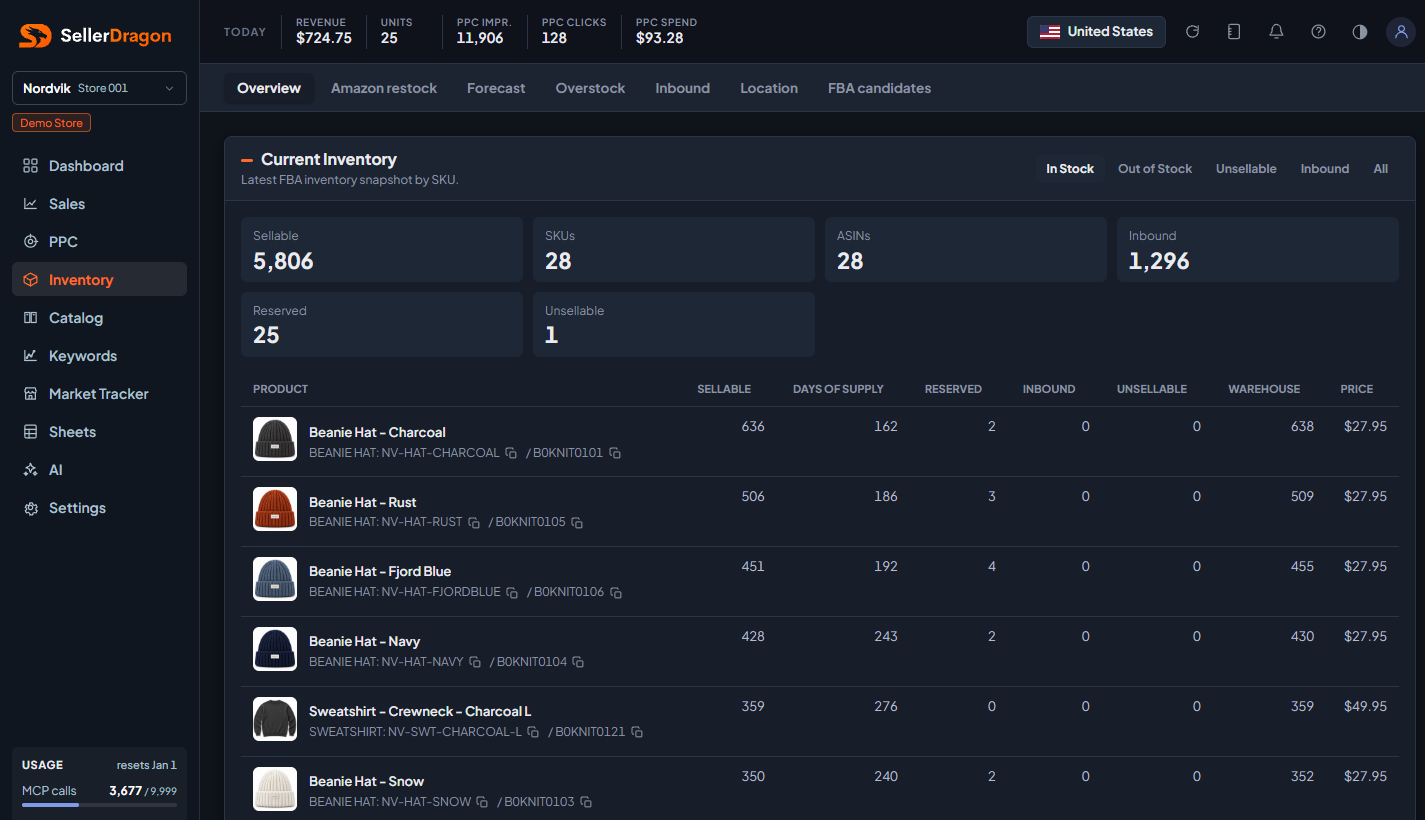
The inventory overview: sellable, reserved and inbound units per SKU, with days of supply.
Step 2: Get Your Lead Time Honest
This is where new sellers fool themselves. They count the shipping and forget the rest.
Lead time has three parts:
- Production: from your order until the goods leave the supplier.
- Shipping: from the supplier to Amazon’s door.
- Amazon check-in: from delivery until the units are actually sellable.
Add all three. Check-in is the one that bites: a shipment that has arrived is not a shipment you can sell.
Then set your stock target. That is the buffer for the weeks when sales run hot or a shipment runs late.
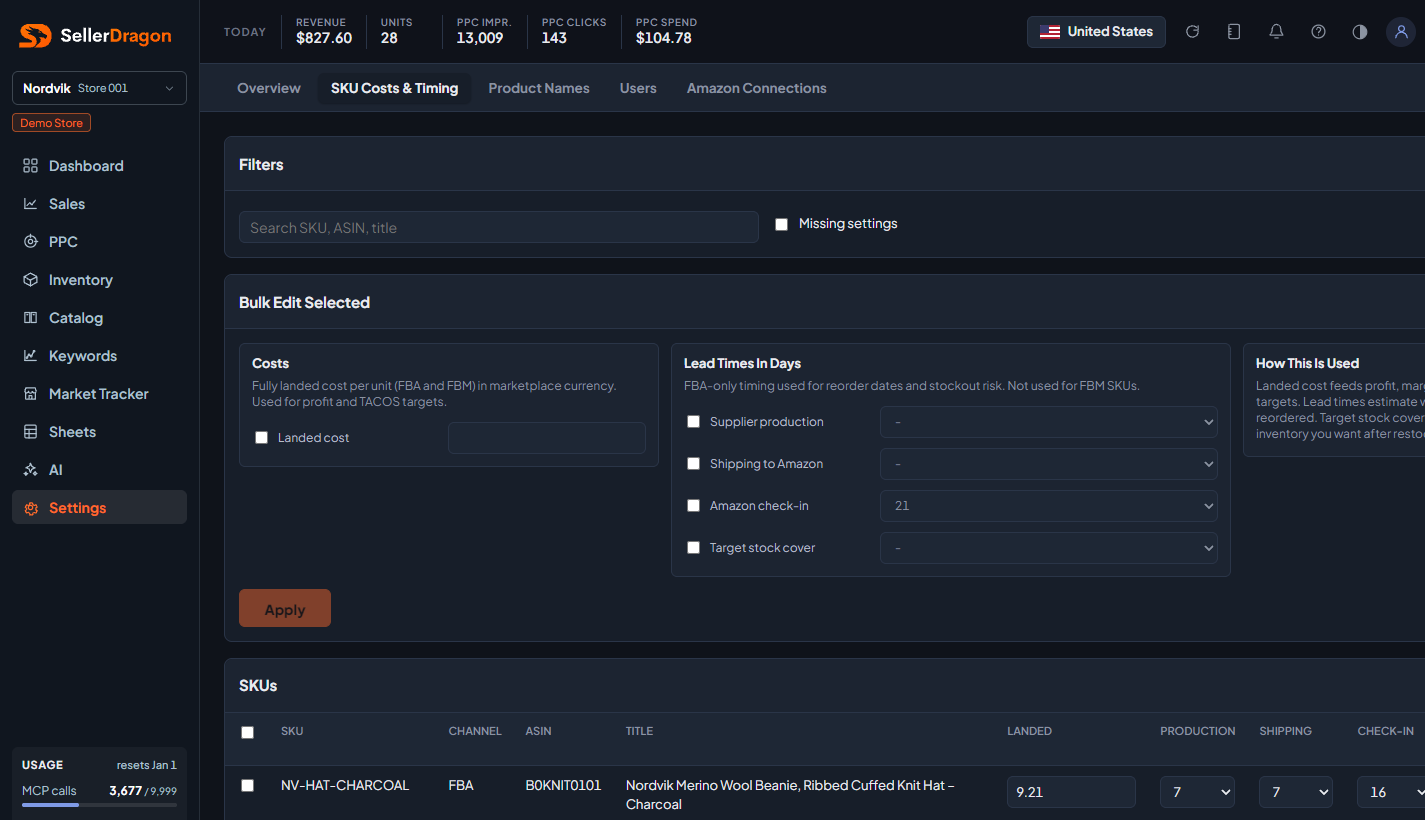
Lead times and stock target per SKU. Here: 7 days production, 7 days shipping, 16 days check-in.
Step 3: Do the Reorder Sum
The sum is short:
Order = expected sales over the lead time + stock target – sellable – inbound
An example with round numbers. You sell 10 units a day. Your lead time is 45 days and you want 30 days of cover.
- Sales over the lead time: 10 × 45 = 450 units
- Stock target: 10 × 30 = 300 units
- You need: 750 units
- You have 300 sellable and 100 inbound: 400 units
- Order: 350 units
The second question is when. The rule is just as short:
If your stock lasts fewer days than your lead time, you are already late.
In the example, 400 units at 10 a day is 40 days of stock against a 45-day lead time. That order should have gone out last week.
Do this on paper for your first product. It takes five minutes and it shows you which of your four numbers you don’t actually know.
Step 4: Read What Amazon Tells You
Amazon gives you its own restock recommendation per SKU: how many units it thinks you should send, and by when.
Treat it as a second opinion, not as the plan. Amazon’s method may or may not account for your season or for sales that are rising or falling.
What you do need from Amazon is its days-of-supply figure, because it decides when Amazon will accept a shipment at all. If Amazon’s own calculation says you already hold enough cover, it will not take more. That number tells you when you can send, not how much.
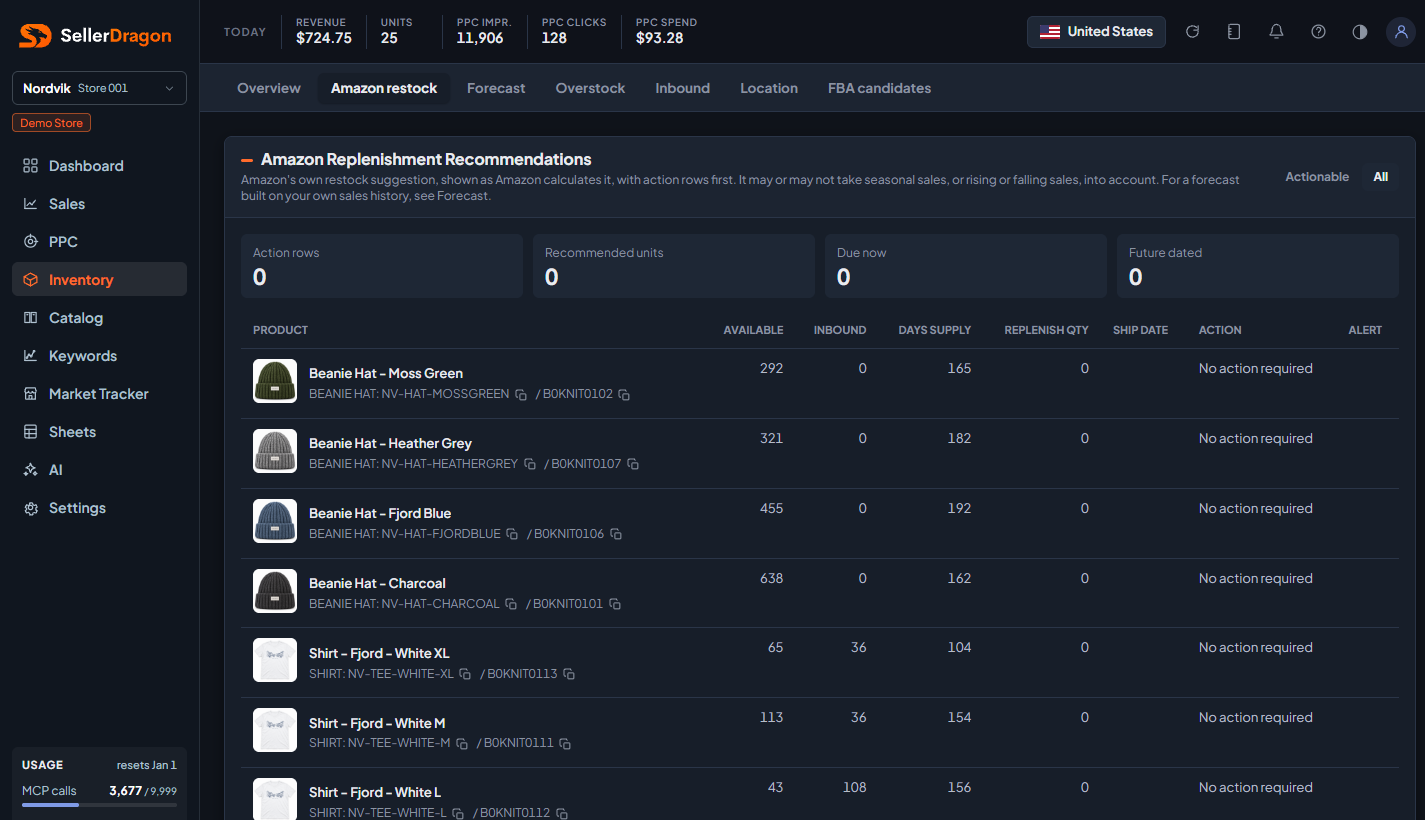
Amazon’s own replenishment recommendations, exactly as Amazon calculates them.
Step 5: Let the Forecast Take Over
The hand sum works for one product. It stops working at twenty, and it ignores the season.
A forecast does the same sum for every product, every day, using your own sales from the same weeks last year. In SellerDragon it gives you three answers per product: how many units to ship now, the date of the next send, and a state. Red means you run out before a shipment sent today can land. Amber means you are below target, so send now.
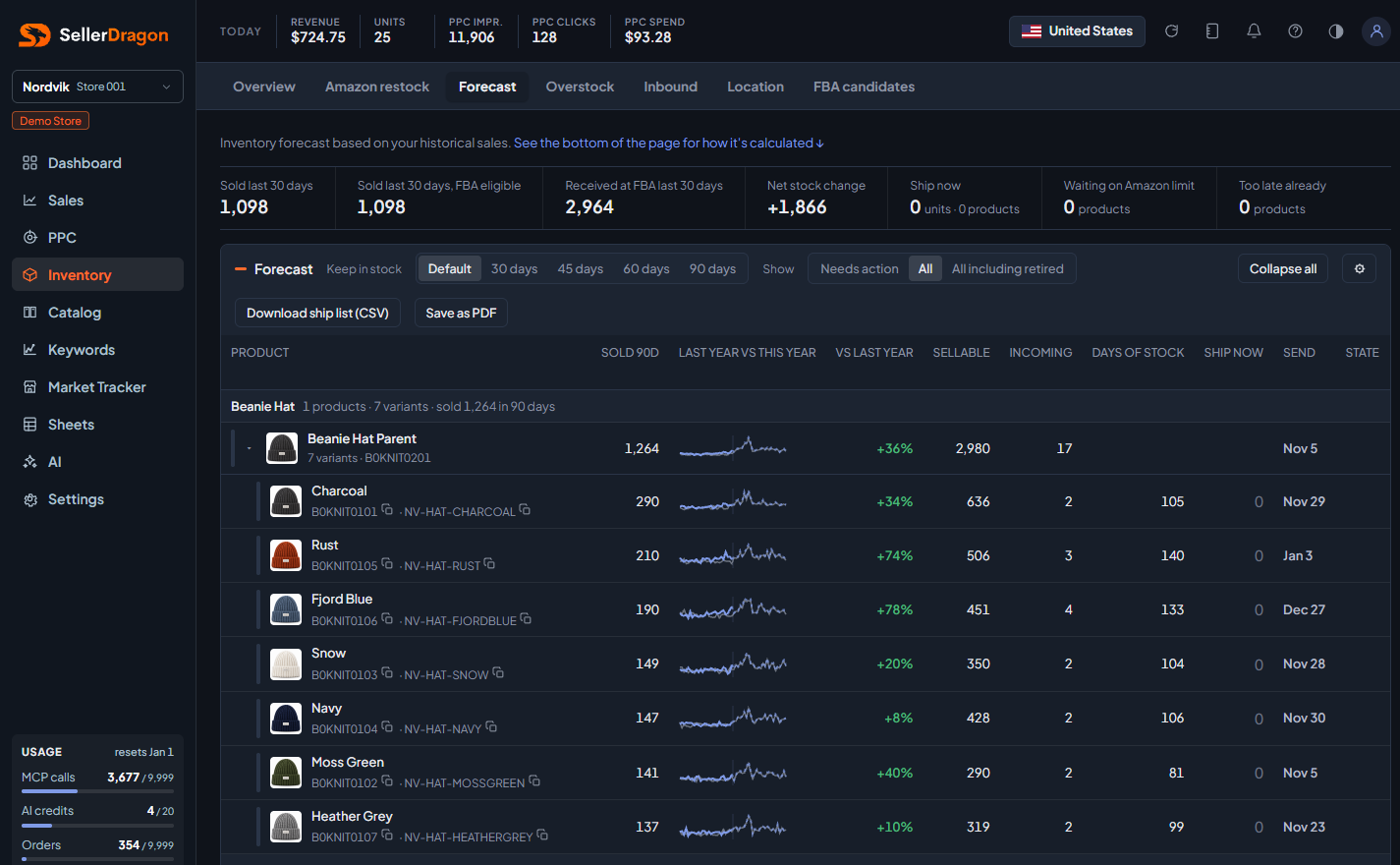
The forecast: sales against last year, days of stock, units to ship now and the next send date.
Open a product and you see the arithmetic, not just the answer. In the example below, the lead time is 30 days and the stock target is 30 days. Expected sales for the next 60 days are 413 units. There are 636 sellable and 2 inbound, so nothing needs to ship today, and the next send is dated.
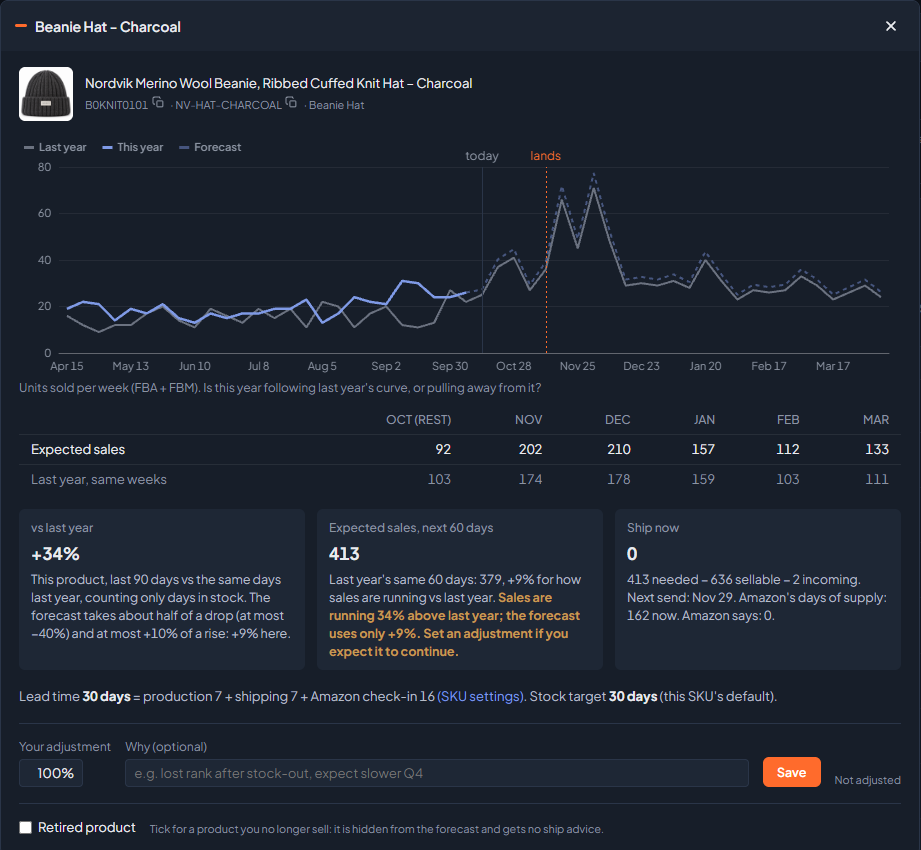
One product: last year, this year and the forecast, with the ship-now sum written out.
One thing to know as a new seller: a forecast needs history.
- Under 30 days of sales: there is nothing to forecast from, so you see Amazon’s number instead. This is when your hand sum from Step 3 matters most.
- Under 15 months of history: the product borrows the seasonal pattern of similar products and is marked as an estimate.
- After that: it runs on the product’s own last year.
Step 6: Don’t Overshoot
After a stockout scare, the reflex is to order a mountain. That costs you too:
- Monthly storage fees, charged by volume
- Aged inventory fees on units that sit too long
- Cash tied up in boxes, which you cannot spend on ads or on your next product
Amazon charges you at both ends. Hold too little and you pay a fee for low stock. Hold too much and you pay for storage and aged inventory.
The band to stay in: 30 days of stock at the least, 120 days at the most.
Enough to stay available everywhere, without paying to store units for months.
Step 7: Check Stock Before You Push Ads
More ads mean faster sales, and faster sales empty the shelf sooner. A campaign that works can bring forward a stockout that was not in your plan.
So before you raise ad spend on a product, check how many days of stock are left at the faster rate, and whether the next shipment lands in time. If it doesn’t, hold the spend until the stock is there.
Wrap-Up: Plan the Reorder Before You Need It
- Write down your four numbers: sales rate, lead time, stock and inbound, stock target.
- Count the whole lead time: production, shipping and Amazon check-in.
- Do the sum: sales over the lead time, plus target, minus what you have.
- If your stock lasts fewer days than your lead time, order now.
- Keep between 30 and 120 days of stock. Amazon charges you below and above.
- Check your stock before you raise ad spend.
Get this right and your listing and your ads keep working. Get it wrong and you pay for the same ranking twice.
SellerDragon does this sum for every product, every day.
Already selling on Amazon?
I run a fixed-price Amazon Account Audit: a full diagnosis of your PPC, listings, inventory and cash flow from your real data, with written findings and a prioritized action plan within 5 business days. See the Amazon Account Audit.